
 max_liu
b7ab7c8514
chore: 更新node_modules依赖文件
max_liu
b7ab7c8514
chore: 更新node_modules依赖文件
|
11 tháng trước cách đây | |
|---|---|---|
| .. | ||
| dist | 11 tháng trước cách đây | |
| CHANGELOG.md | 11 tháng trước cách đây | |
| LICENSE.md | 11 tháng trước cách đây | |
| README.md | 11 tháng trước cách đây | |
| package.json | 11 tháng trước cách đây | |
README.md
PostCSS Dir Pseudo Class 


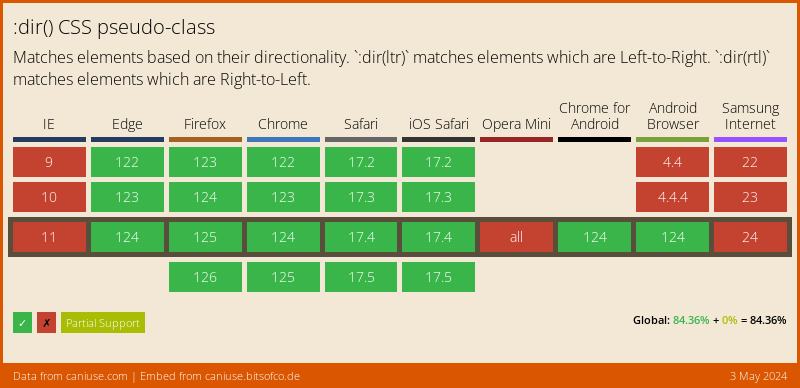
PostCSS Dir Pseudo Class lets you style by directionality using the :dir()
pseudo-class in CSS, following the Selectors specification.
article h3:dir(rtl) {
  margin-right: 10px;
}

article h3:dir(ltr) {
  margin-left: 10px;
}

/* becomes */

[dir="rtl"] article h3 {
  margin-right: 10px;
}

[dir="ltr"] article h3 {
  margin-left: 10px;
}
Maintaining Specificity
Using PostCSS Dir Pseudo Class will not impact selector weight, but it will
require having at least one [dir] attribute in your HTML. If you don’t have
any [dir] attributes, consider using the following JavaScript:
// force at least one dir attribute (this can run at any time)
document.documentElement.dir=document.documentElement.dir||'ltr';
If you absolutely cannot add a [dir] attribute in your HTML or even force one
via JavaScript, you can still work around this by presuming a direction in your
CSS using the dir option, but understand that this will
sometimes increase selector weight by one element (html).
Usage
Add PostCSS Dir Pseudo Class to your project:
npm install postcss-dir-pseudo-class --save-dev
Use PostCSS Dir Pseudo Class to process your CSS:
const postcssDirPseudoClass = require('postcss-dir-pseudo-class');

postcssDirPseudoClass.process(YOUR_CSS /*, processOptions, pluginOptions */);
Or use it as a PostCSS plugin:
const postcss = require('postcss');
const postcssDirPseudoClass = require('postcss-dir-pseudo-class');

postcss([
  postcssDirPseudoClass(/* pluginOptions */)
]).process(YOUR_CSS /*, processOptions */);
PostCSS Dir Pseudo Class runs in all Node environments, with special instructions for:
| Node | PostCSS CLI | Webpack | Create React App | Gulp | Grunt |
|---|
Options
dir
The dir option allows you presume a direction in your CSS. By default, this
is not specified and you are required to include a direction [dir] attribute
somewhere in your HTML, preferably on the html element.
Here’s an example of using the dir option to presume a left-to-right
direction:
postcssDirPseudoClass({ dir: 'ltr' });
.example:dir(ltr) {
  margin-left: 10px;
}

.example:dir(rtl) {
  margin-right: 10px;
}

/* becomes */

html:not([dir="rtl"]) .example {
  margin-left: 10px;
}

[dir="rtl"] .example {
  margin-right: 10px;
}
preserve
The preserve option determines whether the original :dir() rule should
remain in the CSS. By default, the original rule is not preserved.
postcssDirPseudoClass({ preserve: true });
article h3:dir(rtl) {
  margin-right: 10px;
}

article h3:dir(ltr) {
  margin-left: 10px;
}

/* becomes */

[dir="rtl"] article h3 {
  margin-right: 10px;
}

article h3:dir(rtl) {
  margin-right: 10px;
}

[dir="ltr"] article h3 {
  margin-left: 10px;
}

article h3:dir(ltr) {
  margin-left: 10px;
}